Silvera marketing and agent workspace UX review
Reviewed 19 October 2026. Source baseline: 44c84295fa9b324c59b80fa1b111163fdf4f7479 (main, including PR #18).
Goal and design decision
Help visitors move from solar interest to an estimate or product support, and help staff move from an incoming conversation to a useful response with customer context. Keep Silvera's existing navy, blue and cyan palette, official v2 branding, MARSTEK assets and existing customer workspace. Use a compact inbox for operations rather than applying the cinematic landing-page density to staff work.
There is no universally best CRM interface. The following established patterns fit the existing workflow and data model without introducing a new CRM or changing backend permissions.
| Research source | Relevant pattern | Applied decision |
|---|---|---|
| Intercom: The Inbox explained | Filtered conversations, a thread and contextual details | Inbox / conversation / customer panels on wide screens; labeled quick filters and optional details on narrower screens |
| Zendesk: Agent Workspace | Keep channel messages and customer context together | Preserve existing Website, Messenger, WhatsApp and Telegram integrations in one desk; show ownership and contact information beside the thread |
| NN/g: Progressive disclosure | Keep common actions prominent and reveal secondary actions when needed | Keep reply and takeover prominent; place customer erasure inside explicit customer data management, preserving the existing supervisor check and confirmation |
| W3C: Reflow | Retain content and functionality at narrow widths without two-direction scrolling | Single-pane inbox-to-conversation flow on phones; wrapping controls, constrained message tables, minimum-width safeguards |
Current-run evidence and findings
- Marketing entry,
/. The existing scene, photography and brand palette form a strong visual identity. In the captured initial viewport, the large narrative headline dominates, with no hero-level conversion button visible; only the smaller header estimate button is present. Source review confirms the hero buttons were opacity-hidden until scroll progress exceeded 72% of a 400vh section. They are now visible and interactive from the start, with spacing above them adjusted for small screens. Three bilingual task cards connect visitors to the estimate, product catalog and troubleshooting content, plus the existing team contact form. The complete site menu remains intact; inline navigation now starts at the widerxlbreakpoint to reduce header crowding.

- Staff entry,
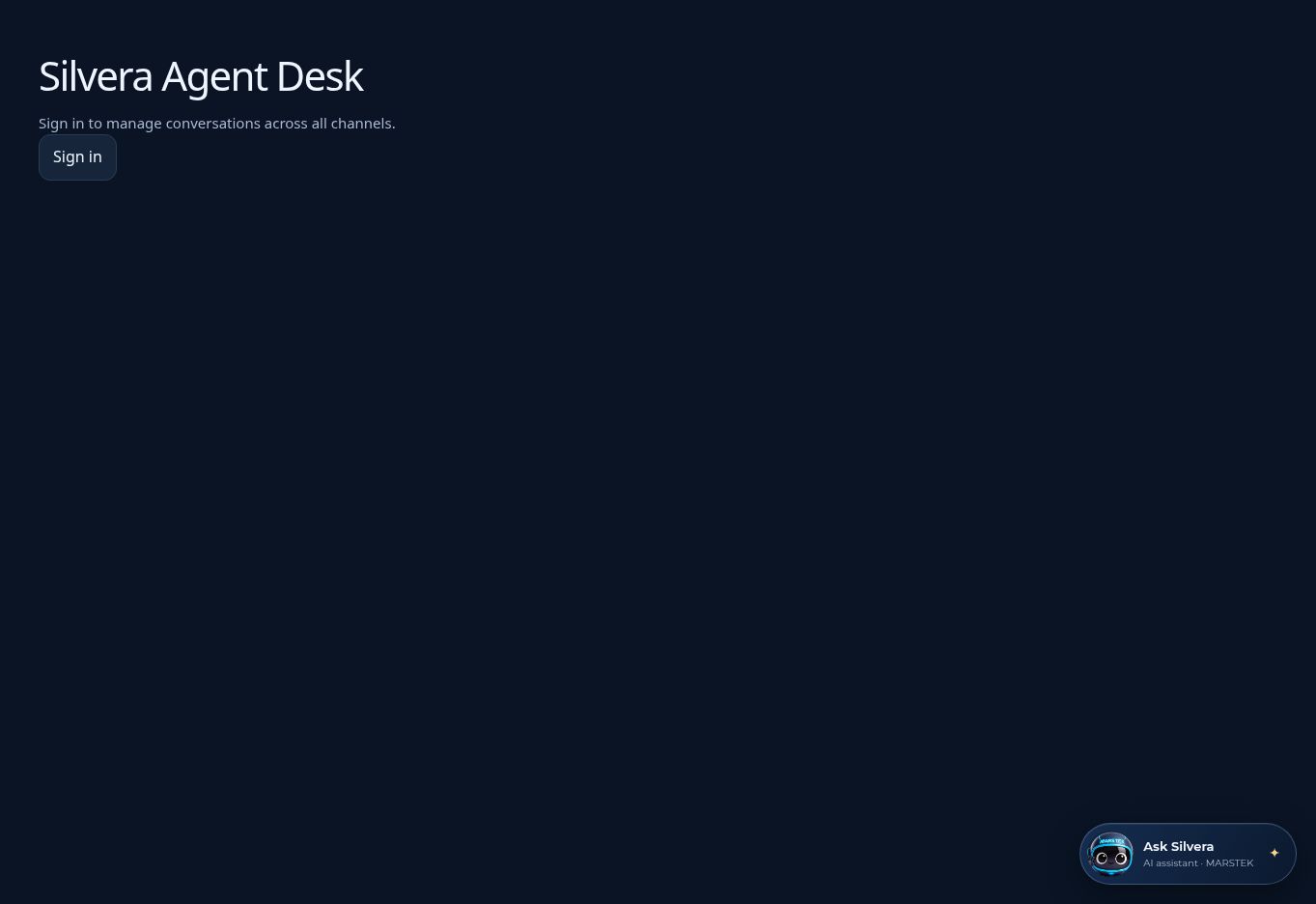
/agents. The captured page shows a plain title and sign-in button in an otherwise empty viewport, with the public assistant launcher competing for attention. The new entry uses the official brand, a short explanation and a single sign-in action. Public chat is hidden only while the agent desk is mounted. Authentication loading gets its own status rather than briefly showing staff-access denial.
- Authenticated desk — source review only. A staff session was unavailable; no production customer records were opened. The source showed a two-column desk, customer records hidden behind a tab, raw
ai/humanstatus labels, erasure alongside common conversation actions, and a mobile list stacked above the thread. Changes add descriptive status badges, a customer summary panel, separate note styling, outgoing/incoming message alignment, explicit empty/loading states, and mobile back navigation with focus restoration. The existing editable Customer and Project tools views remain available. Inbox counts and the unread toggle explicitly describe the loaded subset; they do not claim to represent the whole database.
Verification and limits
- TypeScript and production Vite build passed. Existing large-bundle warnings remain.
- Full application suite passed: 283 tests across 38 files, including five new desk tests covering auth loading, sign-in return path, combined filters, context/back navigation and takeover versus internal-note behavior.
- ESLint with zero warnings passed after correcting the focus effect dependencies.
- Backend integrations, authorization, pricing, quotation calculations and message delivery behavior are unchanged.
- Current-run screenshots above show the pre-change public screens, not the redesigned result. No authenticated visual audit was possible. The managed environment lacked the required preview browser integration, so this PR has not received post-change browser or device QA. No claim of WCAG compliance is made.
- Source was reconstructed from the exact GitHub revision and matching cached blobs. Local validation reused available dependencies; the PR's frozen-lockfile CI is the authoritative install/build gate. Some unchanged public binary assets were unavailable locally, so asset-complete visual verification remains a reviewer task.
Reviewer walkthrough before merge
- At
/, confirm the estimate and product buttons appear before scrolling; check the cinematic sequence and reduced-motion fallback, and follow all three task cards in English and Tagalog. - Test 320px, 390px, 768px, 1024px and 1440px widths, plus keyboard navigation and zoom. Check short-height phones for hero text/button collisions.
- Sign in as an agent and supervisor; verify inbox filters, unread filtering and empty results, then open a long conversation and customer details.
- On a phone, open a thread, use Back to inbox and confirm filters remain. On tablet, toggle details and return to the thread.
- Confirm reply ownership, closed Messenger windows, internal notes, attachments, failed-message retry, follow-ups and customer/project tools using test conversations. Confirm erasure remains supervisor-only with its existing confirmation; do not erase real customer data for UI testing.
This PR is for review. It does not merge or deploy the changes.